 Setonomy
Help
Create a training plan
Ten questions about your goal, days, time and equipment, then Setonomy shows a 4-, 8- or 12-week plan with a preview. The plan is built from your answers using fixed rules, no AI. The questions are free; every exercise in the preview and starting the plan come with Premium.
Where to find it
- Workout
- Create plan
If a plan is already running, you'll find the questions under “Other plans” → “Create new plan.” “Create plan” at the end of the introduction leads there too.
Ten questions
One question per page, with “Question 1 of 10” counting along: goal, experience, days, split, minutes, location, equipment, exclusions, important muscles and length. Whatever Setonomy already knows, for example from “My equipment,” is filled in.
- Goal: Muscle building, Strength, or Fit and healthy.
- Days: 1 to 7 a week. “Specific weekdays” lets you pick them; otherwise Setonomy spreads them evenly. With 7 days, the seventh stays free.
- Split: “Automatic” or your choice. Only splits that fit your days are offered.
- Time and length: 30 to 90 minutes per workout. The plan runs 4, 8 or 12 weeks, with 8 suggested.
The preview
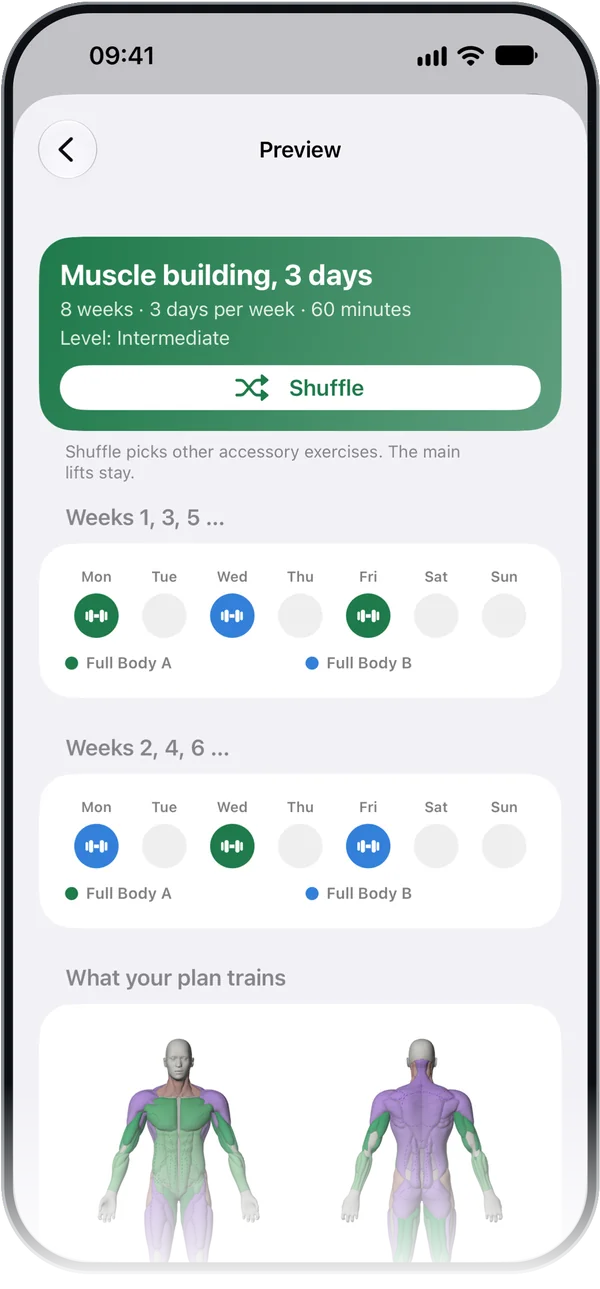
“See plan” shows the name, weeks, days and minutes, the week as a grid and, under “What your plan trains,” a muscle map. Below are the workouts with their exercises and roughly how long they take; tap an exercise to see its form. If the plan alternates between two weeks, the grid shows both, with the line “Alternating. A week without training doesn't count.”
Without Premium, the preview shows only the first exercise of each workout. The others are blurred behind “★ Premium” with their count, such as “5 more exercises, visible with Premium”; a tap opens the purchase page. You see the week, the workouts with their duration, the muscle map and the notes without Premium, too.
“Shuffle” swaps the accessory exercises; the main lifts stay. Without Premium, it carries the badge and opens the purchase page. Under “Start,” choose “This week” or “From Monday.”
Training with the plan
“Start plan” starts the plan. Setonomy sets your weekly goal to the plan's training days and tells you beforehand. On the Dashboard, “Up next” shows the workout for today's or the next plan day.
In the Workout tab, the plan shows “This week · Week 3 of 8” with checkmarks for the days you've done and the next week below. If the plan alternates between two weeks, only weeks with a workout from the plan count: if you miss a week or pause, it continues with the next week in the rotation instead of repeating the same one. A free workout doesn't count. Before the start, after the end and while the plan is paused or resting, it shows its weeks as in the preview: both, if it alternates, with the line “Alternating. A week without training doesn't count.”
Only one plan runs at a time; a new one pauses the current one. “Delete plan” asks whether to move its workouts to the trash or keep them. Your history stays either way.
Without a plan
Create your own workouts under Workout with “+,” using exercises from the library or your own; the button is called “New workout” and opens the editor right away. Without a plan, “Up next” first suggests a workout you've never done, otherwise the one you did longest ago.
Premium
Partly Premium. The questions are free, and so are your own workouts. Without Premium, the preview shows the first exercise of each workout; every exercise, “Shuffle” and starting the plan come with Premium. If Premium ends, the plan rests in its week (“Continues with Premium.”) and its workouts stay under Workout. With Premium, it picks up again in that week (Premium).
Frequently asked questions
Does an AI build the plan?
No. Setonomy builds it from your answers using fixed rules and prefers exercises you've already trained. Chance only picks between accessory exercises that fit equally well. The suggestions during training also follow fixed rules based on your history.
Is a training plan free?
The questions are, and the preview shows the first exercise of each workout. Every exercise, “Shuffle” and starting the plan come with Premium.
Can I get different exercises?
Yes, with Premium: “Shuffle” in the preview swaps the accessory exercises. The main lifts stay.
What happens to my plan when Premium ends?
It rests in its week and picks up there again with Premium. Its workouts stay.
Does a plan change my weekly goal?
Yes, to its training days. The preview tells you before you start the plan.
Can I train without a plan?
Yes. Under Workout, “New workout” lets you create your own workouts.