 Setonomy
Vorschläge aus deinem VerlaufSuggestions from your history
Für Gewicht und Wiederholungen, auf Wunsch mit RPE. Die App sagt dazu, warum.For weight and reps, with RPE if you like. The app tells you why.
Trainingstagebuch & Gym Tracker fürs iPhoneWorkout log & gym tracker for iPhone
Krafttraining planen und tracken, ohne Anmeldung, mit 3D-Clips zu über 520 Übungen. Setonomy führt dich Satz für Satz durchs Workout und zeigt dir, wie du stärker wirst – deine Daten bleiben auf deinem iPhone. Plan and track your strength training. Free to start, no account needed, with 3D animations for 520+ exercises. Setonomy guides you through every workout set by set and shows you how you're getting stronger – your data stays on your iPhone.


Kostenlos, fürs iPhone ab iOS 26.1 · Premium als AboFree, for iPhone with iOS 26.1 or later · optional Premium subscription
Neue Funktionen vorab testen (TestFlight)Try new features early (TestFlight)


Übungen in 3DExercises in 3D
520+als 3D-Animationas 3D animations
Über 520 Übungen als 3D-Animation, die Zielmuskeln hervorgehoben, dazu für jede Übung eine Anleitung Schritt für Schritt. Hier zwei Beispiele direkt aus der App; alle anderen gibt es nur in Setonomy. More than 520 exercises as 3D animations, target muscles highlighted, plus step-by-step instructions for every exercise. Here are two examples straight from the app; all the others are only in Setonomy.
TrainingTraining
Setonomy zeigt dir, was jetzt dran ist, und merkt sich den Rest: Werte vom letzten Mal, Vorschläge für heute, die Pause bis zum nächsten Satz. Setonomy shows you what's next and remembers the rest: values from last time, suggestions for today, the rest until the next set.
Probiere es aus: Werte ändern, Satz abschließen, die Pause läuft. Eine kleine Vorschau aufs Training – die App kann mehr. Try it: change the values, complete the set, the rest timer starts. A small preview of training – the app does more.
Live Activity während der Pause, nachgebautLive Activity during rest, recreated
Für Gewicht und Wiederholungen, auf Wunsch mit RPE. Die App sagt dazu, warum.For weight and reps, with RPE if you like. The app tells you why.
Wiederholungen und Gewicht mit +/– oder dem Ziffernblock. Ab dem zweiten Satz stehen die Werte des vorigen schon drin.Reps and weight with +/– or the keypad. From the second set on, the previous set's values are already filled in.
Aufwärmsätze stehen als Liste da, die du abhakst.Warm-up sets come as a list you tick off.
Über die Live Activity läuft das ganze Training auf dem Sperrbildschirm: Satz abschließen, RPE wählen, Pause verkürzen. Die Dynamic Island zeigt die Restzeit.The Live Activity runs the whole workout on the Lock Screen: complete a set, rate the RPE, shorten the rest. The Dynamic Island shows the time left.
Im Training tauschen und am Ende weitere anhängen, mit Ersatz passend zu deiner Ausrüstung.Swap during a workout and add more at the end, with alternatives that fit your equipment.
Nach dem Training ein Überblick und Vorschläge für deine Planwerte.After training, an overview and suggestions for your planned values.
MuskelkarteMuscle map
Die Muskelkarte im Fortschritt zeigt deinen Körper von vorn und hinten, gefärbt nach den Sätzen der Woche. Das Ziel einer Übung zählt einen Satz, jeder Mitbeweger einen halben. The muscle map in Progress shows your body from the front and back, colored by the week's sets. An exercise's target counts as one set, each assisting muscle as half a set.


Gelb heißt: Da geht noch was. So siehst du sofort, was zu kurz kommt.Yellow means there's more to do. You see right away what's falling behind.


Dreh das Modell, tippe einen Muskel an und sieh, welche Übungen ihn wirklich trainiert haben.Turn the model, tap a muscle and see which exercises actually trained it.


Finde die passende Übung und hänge sie mit „+“ an dein Workout.Find the right exercise and add it to your workout with “+”.
FortschrittProgress
Bestwerte, Volumen und Körpergewicht im Dashboard. Jedes Workout steht mit allen Sätzen im Kalender; Fehler korrigierst du nachträglich. Personal records, volume and body weight on your dashboard. Every workout sits in the calendar with all its sets; fix mistakes afterward.
Beispieldaten über zwölf Wochen.Sample data over twelve weeks.
KörpergewichtBody weight
Trage dein Gewicht ein, Setonomy glättet die täglichen Schwankungen zum Trendgewicht. So siehst du, wohin es wirklich geht. Log your weight and Setonomy smooths the daily swings into a trend weight, so you see where it's really heading.


Jeder Punkt eine Wiegung, die Linie der Trend – über 30 Tage, ein Jahr oder alles.Every dot a weigh-in, the line the trend – over 30 days, a year or all time.


Durchschnitt und Veränderung je Monat, jede Wiegung mit ihrem Unterschied.Average and change for each month, every weigh-in with its difference.
Apple Health
Deine DatenYour data
Deine Daten bleiben bei dir.Your data stays with you.
Keine Anmeldung, kein Server. Alles liegt auf deinem iPhone.No sign-up, no server. Everything lives on your iPhone.
Keine fremden Bibliotheken für Werbung oder Analyse. Auch diese Website lädt nichts von anderen Servern.No third-party libraries for ads or analytics. This website doesn't load anything from other servers either.
Du sicherst deine Daten selbst, auf Wunsch mit Passwort verschlüsselt.You back up your data yourself, optionally encrypted with a password.
TrainingsplanTraining plan
Zehn Fragen zu Ziel, Tagen, Zeit und Ausrüstung, dann zeigt Setonomy einen Plan über 4, 8 oder 12 Wochen mit Vorschau. Der Fragebogen ist frei; alle Übungen der Vorschau und den Plan übernehmen gibt es mit Premium.Ten questions about your goal, days, time and equipment, then Setonomy shows a 4-, 8- or 12-week plan with a preview. The questions are free; every exercise in the preview and starting the plan come with Premium.
Mehr in der Hilfe →More in Help →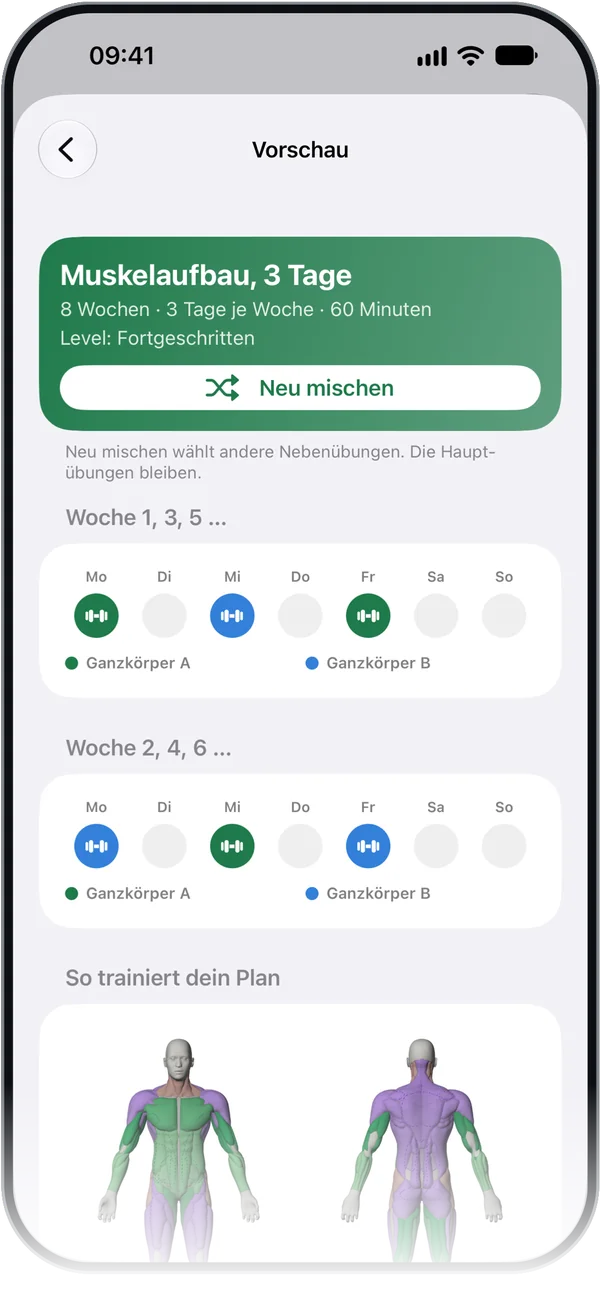
Alle FunktionenAll features
Jede Funktion kurz erklärt, mehr steht in der Hilfe. Every feature in brief, with more in Help.
Setonomy führt dich durchs Workout: Wiederholungen und Gewicht eintragen, Satz abschließen, und die Pause läuft. Auf dem Sperrbildschirm geht das ganze Training über die Live Activity, ohne zu entsperren.Setonomy guides you through your workout: enter reps and weight, complete the set, and the rest timer starts. On the Lock Screen, the whole workout runs through the Live Activity without unlocking.
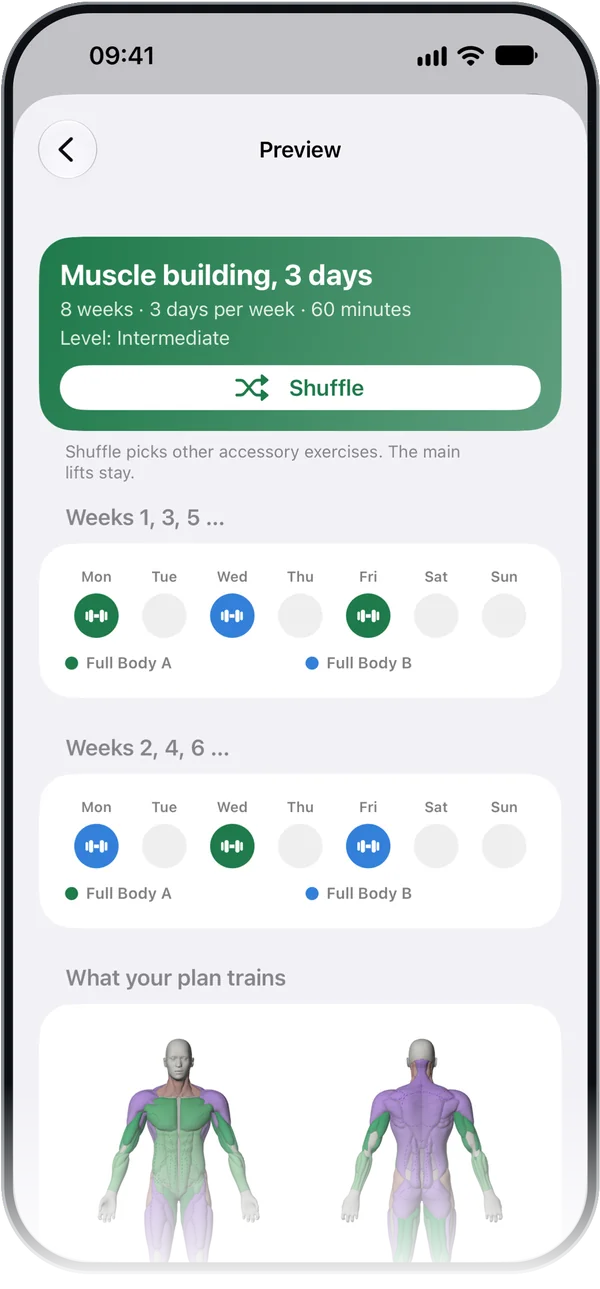
Mehr in der Hilfe →More in Help →Zehn Fragen zu Ziel, Tagen, Zeit und Ausrüstung, dann zeigt Setonomy einen Plan über 4, 8 oder 12 Wochen mit Vorschau. Er entsteht nach festen Regeln aus deinen Antworten, ohne KI. Der Fragebogen ist frei; alle Übungen der Vorschau und den Plan übernehmen gibt es mit Premium.Ten questions about your goal, days, time and equipment, then Setonomy shows a 4-, 8- or 12-week plan with a preview. The plan is built from your answers using fixed rules, no AI. The questions are free; every exercise in the preview and starting the plan come with Premium.
Mehr in der Hilfe →More in Help →Über 800 Übungen mit Anleitung auf Deutsch und Englisch, mehr als 520 davon als 3D-Clip, mit Ziel- und Mitbeweger-Muskeln. Dazu eigene Übungen, Favoriten und Vorschläge zum Tauschen.800+ exercises with instructions in English and German, 520+ of them as 3D animations, with target and assisting muscles. Plus custom exercises, favorites and suggestions for swapping.
Mehr in der Hilfe →More in Help →Die Muskelkarte färbt deinen Körper nach den Sätzen dieser oder der vorigen Woche, vorn und hinten. Muskelgruppen sind frei; mit Premium siehst du 67 Muskeln einzeln im 3D-Modell, mit ihren Übungen.The muscle map colors your body by your sets this week or last week, front and back. Muscle groups are free; with Premium you see 67 individual muscles on a 3D model, with their exercises.
Mehr in der Hilfe →More in Help →Unter Fortschritt siehst du dein Volumen, deine Bestwerte mit geschätztem 1RM und, was du am meisten trainierst. Mit Premium kommen Hauptübungen, Kurven je Übung, Workout-Vergleiche und Pulskarten dazu.Progress shows your volume, your records with an estimated 1RM, and what you train most. Premium adds main lifts, charts per exercise, workout comparisons and heart rate cards.
Mehr in der Hilfe →More in Help →Im Verlauf stehen deine Workouts im Kalender nach Woche oder Monat, auf Wunsch nach Workout gefiltert. Jedes zeigt Dauer, Volumen und RPE, mit Pulsmessung auch die Pulskurve, und lässt sich nachträglich korrigieren.History lists your workouts in a calendar by week or month, filtered by workout if you like. Each one shows duration, volume and RPE, plus a heart rate chart if measured, and you can correct it afterward.
Mehr in der Hilfe →More in Help →Trag dein Gewicht ein oder übernimm es aus Apple Health. Setonomy zeigt die Wiegungen als Punkte, einen geglätteten Trend und die Änderung in 30 Tagen; je Tag zählt die früheste Wiegung.Log your weight or bring it in from Apple Health. Setonomy shows your weigh-ins as dots, a smoothed trend and the change in 30 days; each day, the earliest weigh-in counts.
Mehr in der Hilfe →More in Help →Setonomy schreibt Workouts und Körpergewicht nach Apple Health und liest dein Gewicht und den Puls im Training. Jeder Schalter einzeln, ab Werk alle aus; Setonomy ändert nur, was es selbst geschrieben hat.Setonomy writes workouts and body weight to Apple Health and reads your weight and your heart rate during workouts. Each switch is separate and off by default; Setonomy only changes what it wrote itself.
Mehr in der Hilfe →More in Help →Setonomy braucht kein Konto und speichert deine Daten auf deinem iPhone. Ein Backup exportierst du als Datei, auf Wunsch mit Passwort verschlüsselt, und übernimmst es auf einem anderen iPhone.Setonomy doesn't need an account and stores your data on your iPhone. You export a backup as a file, password-encrypted if you like, and import it on another iPhone.
Mehr in der Hilfe →More in Help →Premium bringt Pläne über Wochen, Fortschritt im Detail, die Muskeln einzeln und mehr. Es gibt ein Monats- und ein Jahresabo, das Jahresabo mit zwei Wochen zum Testen; endet das Abo, bleiben deine Daten.Premium adds plans over weeks, detailed progress, individual muscles and more. There's a monthly and a yearly subscription, the yearly one with a two-week free trial; when it ends, your data stays.
Mehr in der Hilfe →More in Help →Schreibe an den Support, wir antworten persönlich. Write to support, we answer personally.
Kostenlos, fürs iPhone ab iOS 26.1 · Premium als AboFree, for iPhone with iOS 26.1 or later · optional Premium subscription